SamsungFrpTool Step-by-Step Guide: Bypass FRP via MTP and ADB
If You’re Tired Of Fighting With Frp-locked Samsung Phones And Bouncing Between Random Tricks You’re Not Alone. Many Technicians And Users Just Want A Clear Repeatable Way To Remove The Google Account Lock Without Wasting Hours. Samsungfrptool Is Built Exactly For That: A Focused Frp Bypass Solution That Keeps Everything In One Simple Place.
What Is The Samsungfrptool?
Samsungfrptool Is A Windows-based Frp Bypass Utility Designed Specifically For Samsung Devices. It Packs Several Proven Methods Into A Single Interface Including Bypass Frp (mtp Mode) Reset Frp (adb Mode) Launch Browser Option And Direct Frp Unlock (android 9 / 10 / 11 / 12 Support). Instead Of Juggling Different Scripts And Apps You Can Pick The Method That Matches The Phone’s Android Version And Security Patch. This Makes It A Practical Choice For Technicians Looking For Reliable Gsm Tools In One Place.
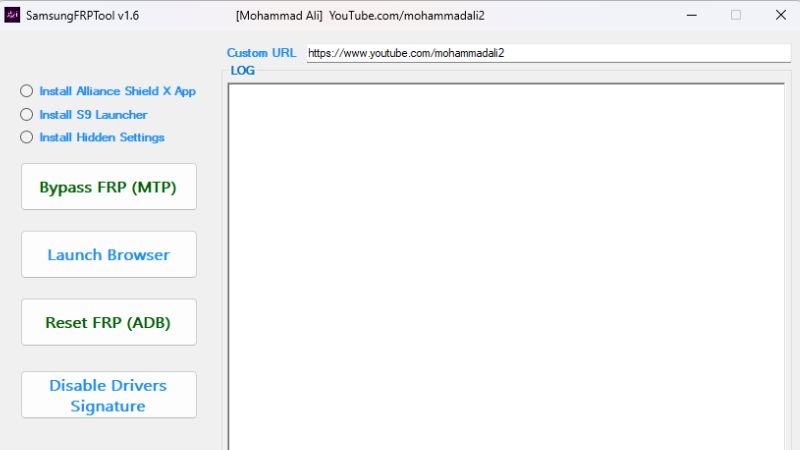
Alongside These Core Functions The Tool Supports Flows That Use Helper Apps Like Install Alliance Shield X App Install S9 Launcher And Install Hidden Settings. These Apps Can Open Up Hidden Menus App Drawers Or System Settings That Frp Would Normally Block. In Real-world Use Samsungfrptool Becomes A Small Control Panel For Most Of The Modern Frp Tricks You Actually Need
Key Features You’ll Use Every Day
One Of The Biggest Strengths Of Samsungfrptool V1.6 Is How It Puts All Your Main Frp Actions On A Single Clean Screen. You’ll See Clear Buttons For Bypass Frp (mtp Mode) Launch Browser Option Reset Frp (adb Mode) And A Dedicated Bar For Direct Frp Unlock (android 9 / 10 / 11 / 12 Support). This Layout Keeps You From Hunting Through Menus While You’re Trying To Work On A Live Device.
The Custom Url Option Is Another Powerful Feature Letting You Open Specific Web Links App Pages Or Downloads Directly On The Locked Phone. Combined With Built-in Flows To Install Alliance Shield X App Install S9 Launcher And Install Hidden Settings It Gives You Several Different Paths Into System Menus And Account Screens. For A Busy Repair Shop That Flexibility Means More Successful Unlocks And Fewer Phones Returning As “No Fix.”
Using Bypass Frp (Mtp Mode) And Launch Browser Option
On Many Samsung Devices Bypass Frp (mtp Mode) Is The First Thing You’ll Try. With The Phone Connected Via Usb In Mtp Mode Samsungfrptool Sends A Sequence Of Commands Or Triggers That Attempt To Open A Browser Or Another Entry Point Despite Frp Being Active. When It Works You Suddenly Get Access To A Browser Window Instead Of Being Stuck On The Setup Screen.
From There Launch Browser Option Lets You Open Samsung Internet Or Chrome More Reliably. Once The Browser Is Open You Can Use Custom Url Option To Visit Download Pages Login Portals Or Specific Tools That Help You Complete The Bypass. This Softer Approach Often Solves The Issue Without Touching Deeper System Partitions Or Wiping The Device Completely.
Reset Frp (Adb Mode) For Deeper Control
Some Phones Block Mtp-based Tricks Especially With Newer Firmware. That’s When Reset Frp (adb Mode) Becomes Useful As Long As You Can Enable Adb On The Device Through Previous Steps Or An App-based Method. With Adb Access Available Samsungfrptool Can Send Controlled Commands From Your Pc To Reset Frp-related Data.
This Path Is More Technical But Also Offers More Precision. You Can See Exactly When The Device Connects Confirm The Adb Authorization And Then Let The Tool Handle The Reset Process. For Technicians Who Like Command-line Control Without Typing Every Command Manually Reset Frp (adb Mode) Is A Comfortable Middle Ground Between Soft Bypass Tricks And Full Firmware Flashing.
Basic Requirements And Driver Setup
Before You Run Samsungfrptool You Should Prepare Your Pc And Workspace. Use A Stable Windows System Avoid Running Too Many Other Heavy Tools At The Same Time And Keep Antivirus From Blocking The Program’s Actions. Always Connect Through A Good-quality Usb Cable Directly To The Motherboard Instead Of Cheap Hubs That Can Drop The Connection Mid-process.
Next Install The Latest Samsung Usb Drivers And Confirm That The Device Appears Properly In Both Mtp And When Available Adb Modes. If Driver Installation Fails Or You See Signature Errors Temporarily Disable Drivers Signature Finish The Install And Restart Your Pc. A Clean Stable Driver Setup Is One Of The Biggest Factors In Avoiding Random Errors Or Incomplete Frp Operations.
How To Download
If You Want To Download This Gsm Tools First Go To A Trusted Gsm Forum Or Official Website. Search For The Latest Version Of The Gsm Tool Then Click On The Direct Download Link Or Mirror Link They Provide. After The File Is Downloaded Extract It With Winrar Or 7‑zip And Run The Setup Or Main .exe File As Administrator On Your Windows Pc.
Conclusion
Samsungfrptool Takes Many Scattered Frp Tricks And Organizes Them Into One Clear Practical Tool For Samsung Devices. With Functions Like Bypass Frp (mtp Mode) Launch Browser Option Reset Frp (adb Mode) Direct Frp Unlock (android 9 / 10 / 11 / 12 Support) Custom Url Option And Support For Helper Apps Such As Alliance Shield X S9 Launcher And Hidden Settings It Gives You Multiple Paths To Success. Used On A Well-prepared Pc With Proper Drivers It Can Turn Stressful Frp Jobs Into Routine Work.
Always Use Samsungfrptool Responsibly Only On Devices You’re Allowed To Service And Start With The Least Risky Methods First. If You Stay Updated And Keep Refining Your Workflow This Tool Can Become One Of The Most Valuable Parts Of Your Samsung Repair Toolkit—and A Strong Companion To Any Resources Or Backlinks You’re Building From Your Other Pages.


Post Comment