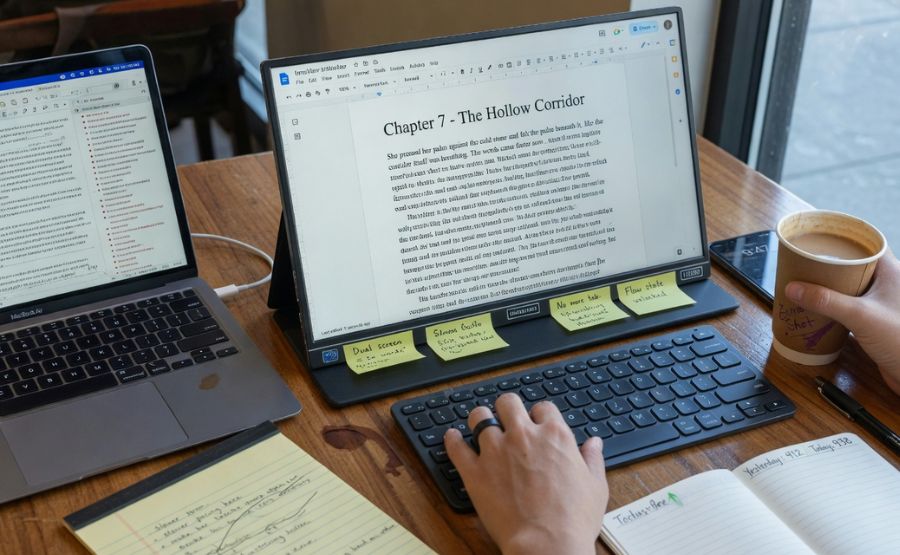
How a Portable Monitor Helps You Write Faster and Better
Speed and quality are what writers, bloggers, students, marketers, and remote professionals care about the most these days. Your writing workspace, tools, and how you organize your flow affects these outcomes.
We take a closer look at how a second monitor can take your writing game to the next level.
We will cover:
- How screen space for writers can speed up writing
- Why a multi-screen setup helps you stay more focused while writing
- Foldable monitor and 19 inch 4k monitor examples and how they benefit you
Let’s get started.
Why Screen Space Is Important for Writers
Writing rarely involves staring at a blank page and filling it with words.
Writers are constantly multitasking between:
- Research sources
- Writing outlines
- Taking notes
- Using grammar tools
- AI writing assistants
- Looking up reference documents
- Switching to communication apps
The challenge is that if everything is spread across one screen, it quickly creates visual and mental clutter and slows down the writing workflow.
The solution is a multi-screen setup that provides a screen for each activity.
A Sample Multi-Screen Writing Setup
Instead of having to jump between open tabs and applications all the time, dedicate each screen to one function.
For example:
| Screen | Purpose |
| Main Screen | Writing draft |
| Second Screen | Research, notes, outline |
| Optional Third Screen | Editing tools, client chat |
Writing Workflow
Assign each application, tab, or reference document its own space on a second or third screen and use your main screen to write uninterrupted.
You will see that this simple arrangement immediately minimizes tab switching and helps you sustain your writing rhythm.
Write Faster with Improved Workflow
Window switching is one of the biggest time-drains in the writing process.
The constant distraction and loss of focus each time you jump between your draft and a reference or grammar tool eats into valuable time.
The portable monitor solves this problem by reducing this window hopping to zero.
Multi-Screen Writing Setup Example
Let’s say you need to write a 1000-word article for a blog. A two screen setup for this looks something like:
Screen #1: Google Docs / Word / Notion app
Screen #2: Research articles / competitor analysis / keyword list / outline
With this workflow, you can simply:
- Read on one screen
- Write on the other in real time
- Eliminate all window switching
No more:
- search → switch to another tab → copy information → switch back → type
Instead:
- continuous read-write-read
Which activity would you rather do 1000 times? Copy-pasting results from your research into your document wastes a lot of time and effort.
With a two screen setup, your writing speed almost doubles.
Write Better with Less Distraction
Speed is not everything, but good quality writing requires it.
The quality of the writing directly correlates with the level of focus that you are able to maintain.
Cluttered workspaces lead to scattered thinking. A separate monitor automatically declutters your environment and helps you focus better.
Foldable Monitor Advantage
The nice thing about a foldable monitor is that you can use it to create a distraction-free writing setup almost anywhere:
- Home office
- Local café
- Co-working space
- University library
- While traveling
Flexible portability makes it easier to stay productive when you are not at your desk. This flexibility is especially useful for:
- Digital nomads
- Freelance writers
- Students
- Bloggers
- Content creators
Clean multi-screen writing environment promotes immersion in the writing process and helps you get more done with less distraction.
Smooth Research & Fact Checking
Writing quality also depends on research quality. Inaccurate or sloppy writing cannot be fixed in editing. Whether you are writing for SEO, academic, scripts, or marketing purposes, fact checking is essential.
A second display is a massive time-saver during research.
Workflow Example: Research & Fact Checking
Here is a side-by-side comparison of how research workflow looks without vs. with a second screen:
| Task | Without Second Screen | With Multi-Screen |
| Open references | Constant tab switching | Always visible |
| Compare sources | Difficult | Easy side-by-side |
| Fact checking | Slow | Fast |
| Citation writing | Interruptive | Seamless |
This type of workflow is useful for:
- SEO writers
- Content marketers
- Copywriters
- Students
- Researchers
Effortless Editing and Proofreading
Editing makes great writing happen. A second monitor will also make it easier for you to proofread your work by providing additional screen real estate to do an effective review.
Workflow Example: Editing with Dual Screens
Split your screen in two and compare the edited version with the original for spot repetitive words, better grammar, and a natural flow.
| Left Screen | Right Screen |
| Original Draft | Edited Version |
Editing your own work also gets easier with side-by-side comparisons. Writers working on client projects often have to compare their final draft with the brief and SEO or formatting requirements from the client.
Managing multi-screen writing flow with AI Assistants
AI writing assistants are changing the way we write. Content generation tools are used for brainstorming, outlines, grammar suggestions, rewriting, and even headline generation.
A foldable monitor (or any second display) can supercharge the use of these AI tools in your writing process.
AI Writing Workflow
Set up a two-screen workflow as described earlier:
| Screen 1 | Screen 2 |
| Writing document | AI assistant / research tool |
AI writing assistants work the fastest when you can immediately apply ideas without having to copy text back and forth between multiple open browser tabs.
This is one of the fastest ways to improve your output quality while shaving time off the process.
Why a Foldable Monitor Is Perfect for Writers on the Move
Portability is a key productivity factor for freelancers and remote workers. A foldable monitor is a perfect choice for those who want flexibility with no productivity tradeoffs.
Benefits:
- Lightweight
- Takes up little space in travel bag
- Easy laptop extender setup
- Portable screen works everywhere
Writers can work from a variety of locations using the same productive multi-screen writing flow.
Foldable monitors are a perfect fit for:
- Digital nomads
- Freelance writers
- Students
- Online content creators
Does Screen Resolution Affect Writing?

Yes, screen resolution is a factor. Text is sharper and more readable on 19 inch 4k monitor and other high-res displays.
Higher resolution = less eye strain on long writing sessions
- Clearer fonts
- Larger visible workspace
- Easier split-screen setup
- Crisper editing UI
Compare Different Monitor Resolutions
| Monitor Type | Best For |
| HD | Basic writing |
| Full HD | Daily work |
| 19 inch 4k monitor | Professional long-form writing |
Resolution matters most for writers who spend 6–8 hours a day at a screen. A crisp display takes the strain out of staring at a screen.
Productivity Benefits Summary
| Benefit | Impact on Writing |
| Less tab switching | Faster writing |
| Better focus | Higher quality |
| Easier research | More accuracy |
| Better editing | Cleaner content |
| Portable setup | Work anywhere |
Best Cases for Writing with Multiple Screens
Multi-screen writing setups are ideal for:
- Blog writing
- Script writing
- SEO content creation
- Academic writing
- Client project work
- Copywriting
- Social media content
No matter what niche you are in, adding more screen space to your workflow is a productivity win.
FAQs
1. Does a portable monitor really help me write faster?
– Yes. It cuts out time lost switching tabs back and forth and helps keep research and draft visible simultaneously.
2. Is a foldable monitor good for writing on the go?
– Absolutely. A foldable monitor is a perfect choice for writers who work remotely or travel frequently.
3. Is a 19 inch 4k monitor good for writing?
– Yes. A 19 inch 4k monitor has a high-resolution display and provides excellent text clarity. This helps reduce eye strain during long writing sessions.
4. Can a second screen be useful for students?
– Definitely. Students can keep their notes, lectures, and assignments open all the time while writing or editing.
5. Is a portable multi-screen writing setup worth it for freelancers?
– Yes, especially for freelance writers who do research-heavy work or work on client-based projects.
Final Thoughts
A multi-screen writing setup is no longer a luxury. It is a must-have productivity upgrade.
Portable monitor , foldable monitor , or a 19 inch 4k monitor, the benefits are the same:
- Write faster
- With better quality
- With better focus
- Easier editing
- More flexible workspace
If you take your writing seriously, adding a second screen is one of the best productivity hacks to your workflow.




Post Comment