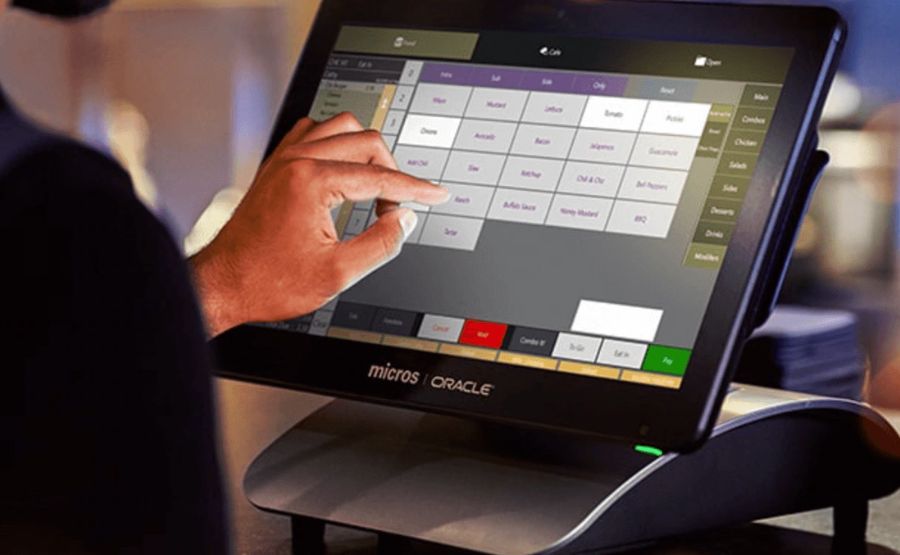
Oracle MICROS POS Integration: How Restaurants Can Modernize Payments Without Replacing Their POS
Ripping out your POS is not the answer. If you’re running a restaurant or hotel on micros oracle hardware and someone tells you the only path to contactless payments and clean reconciliation is a full system swap — they’re either selling you something or they haven’t actually worked a dinner service. The real question is: how do you bolt modern payment flows onto what you already have, without breaking your end-of-day and without a six-figure rip-and-replace? That’s what this article is about.
What “Integration” Actually Means in a MICROS Environment
MICROS is a POS platform. It handles orders, table management, and tender recording. What it does not do natively — and this trips up a lot of operators — is process payments itself. Payment processing in a MICROS setup runs through a certified partner gateway and a paired terminal device. The POS fires a transaction request; the gateway handles the card; the terminal captures chip or tap data. Three separate components. Three potential failure points.
The integration layer between MICROS and those external components is typically the Oracle Payment Interface (OPI) or a certified third-party connector. Your specific path depends on which version of MICROS you’re running and which payment partner is certified for that build. There’s no one-size-fits-all stack here — and anyone who says otherwise hasn’t read the deployment docs.
Why Operators Keep Running Into Reconciliation Nightmares
Here’s where it breaks. During a busy Friday dinner rush, transactions flow fine. Then at 11pm close, your manager pulls the settlement report and the POS tender totals don’t match the processor batch. Again. That mismatch is almost always one of these:
- Wrong terminal ID mapped to the wrong workstation — the gateway posts to one terminal record, MICROS logs to another
- Gateway timeout mid-transaction — the processor approved the charge, but MICROS never got the confirmation, so the tender shows as open or voided
- Contactless tender type not enabled in MICROS — tap payments go through the terminal fine, but POS doesn’t record them as a separate tender category, so your reports are dirty
- EMV terminal not properly paired after a reboot or software update — the device stops communicating with the POS and staff manually keys card numbers (which is a PCI problem, not just an ops problem)
- Batch settlement time mismatch — processor closes the batch at midnight, your POS business day closes at 2am, and now two days’ transactions are bleeding into each other
I’ve seen all five in the same property. The fix is never “buy a new POS.” The fix is tightening the integration configuration.
EMV and Contactless: What You Actually Need to Enable
If your terminals accept chip cards but your tap rate is near zero, that’s a configuration issue — not a hardware issue. EMV chip and contactless (NFC) acceptance are defined at the terminal firmware and gateway level, per EMVCo standards. The terminal needs to have contactless enabled in its configuration, and the gateway needs to pass that tender type back to MICROS correctly.
Apple Pay and Google Pay ride on the same NFC contactless rails. Enable contactless properly and you get all three. The catch is that MICROS needs a matching tender mapping for “contactless” or “mobile wallet” — otherwise those transactions post to a generic card bucket and your category reporting becomes useless.
Check this before assuming you need new hardware:
- Is the contactless indicator light active on your terminal?
- Does your gateway configuration show NFC/contactless as an enabled payment method?
- Does MICROS have a tender type mapped specifically to contactless transactions?
- When you run a test tap, does the tender appear correctly on the POS receipt?
If any of those fail — that’s your problem. Not the POS itself.
PCI Scope and Why It Matters More Than You Think
This part operators skip until they get hit with a compliance questionnaire. PCI DSS requires a clean boundary between your POS environment and the payment processing layer. In a properly integrated MICROS setup, raw cardholder data never touches the POS database. The terminal encrypts at the point of swipe or tap; the gateway tokenizes before anything posts back to MICROS.
When that boundary breaks — usually because someone hardcoded a card number into a workaround, or a legacy terminal isn’t encrypting correctly — your entire POS environment falls into PCI scope. That means a much heavier compliance burden and real liability exposure if there’s a breach.
The practical check: if your MICROS system ever stores, processes, or transmits a full card number, something in your integration is misconfigured. Tokenization and end-to-end encryption (E2EE) should mean MICROS only ever sees a token — a reference number that’s useless to anyone who intercepts it.
Hotel and Multi-Venue Operations: The PMS Layer
For properties running both a restaurant POS and a hotel management system, the integration chain gets longer. Charges need to flow from MICROS through to the property management system for room posting, folio management, and unified guest billing. This is where micros pms connectivity becomes operationally critical — a misconfigured bridge between POS and PMS is one of the most common sources of front-desk billing errors in hotel F&B operations.
The failure mode here is subtle. During breakfast service, a guest charges to their room. The POS shows the transaction posted. But the front desk sees nothing on the folio. At checkout, the guest disputes the charge, the manager has to manually reconcile, and someone eats the cost. That’s not a payment problem — that’s a posting integration problem. Verify the PMS interface mapping every time you update MICROS or change your PMS version. These two systems don’t always negotiate version changes gracefully.
Choosing an Integration Partner: What to Actually Evaluate
The payment processor market is noisy. Every gateway claims MICROS compatibility. The real filter is certification — specifically, whether the gateway has a current, maintained certification for your version of MICROS. Certifications expire. Versions change. A gateway that was certified for an older MICROS build may not fully support your current setup.
When you’re evaluating partners, push on these points:
- Which specific MICROS version and build is your integration certified for?
- How do you handle terminal ID mapping and workstation assignment?
- What does your settlement reconciliation report look like — and can it export in a format that matches our POS tender categories?
- What’s your process when a gateway timeout creates a transaction mismatch at end-of-day?
- Do you support E2EE and tokenization at the terminal level, or does cardholder data pass through your gateway in cleartext at any point?
A partner who can answer those questions specifically — not with marketing language — is worth talking to. One who pivots to brochure copy when you get technical probably hasn’t done enough MICROS deployments to trust with your environment.
Reducing Manual Work at End-of-Day
The operational ROI of a properly configured integration isn’t just about payment speed at the table. The real savings come from eliminating the manual reconciliation grind at close. When terminal IDs are mapped correctly, tender types are categorized accurately, and settlement batches align with your POS business day — your manager’s close routine shrinks from a 45-minute investigation to a five-minute sign-off.
That’s not a feature claim. That’s what happens when the configuration is right versus when it’s wrong. I’ve watched managers spend an hour every night manually matching POS reports against processor statements because one terminal was posting to the wrong gateway mapping. Fix the mapping — close the gap.
The technology to run EMV, contactless, Apple Pay, tokenization, and clean automated reconciliation on your existing MICROS hardware already exists. The gap is almost always configuration, not capability. Audit your terminal pairing, your tender mappings, your gateway certification, and your PCI boundary before you sign any contract for new hardware. Most of the time, the answer is already in your current system — it just needs to be set up correctly.




Post Comment